Modern offices no longer revolve around desks, chairs, and meeting rooms alone. The way people work has shifted. Devices move between home, office, and shared spaces. Teams collaborate across locations. Data flows through cloud platforms and mobile apps every hour. In this setting, security is no longer just an IT responsibility. It becomes part of how the workspace is designed, used, and experienced every day.
A well-designed office now considers how employees connect to networks, store information, and interact with shared systems. It shapes behavior. It reduces risks before they become incidents. From password habits to WiFi usage, the physical environment plays a direct role in digital safety. The most effective workplaces understand this connection and build security into the structure of everyday work.
Quick Summary
- Workplace security now extends beyond IT systems into physical office design
- Hybrid work increases exposure to network and device vulnerabilities
- Smart layouts and clear workflows reduce human error risks
- Employee habits are shaped by environment and design choices
- Security-aware offices improve both productivity and trust
Security Starts with How People Work
Office design influences behavior more than most teams realize. Employees respond to their environment. If secure practices are difficult, they are often ignored. If they are simple and visible, they become routine. This is where workplace design meets security strategy in a practical way.
Many organizations already encourage better habits through cybersecurity best practices. These include strong passwords, device protection, and awareness of suspicious activity. However, without a workspace that supports these actions, adoption remains inconsistent. A secure workplace is one where the environment reinforces these habits rather than working against them.
For example, open coworking layouts can increase exposure to shoulder surfing. Shared desks may lead to unattended devices. Poorly structured WiFi access points can allow insecure connections. Each of these risks comes from design decisions, not just user mistakes. Fixing them requires thinking about security from the start.
How Hybrid Work Changed Office Priorities
Hybrid work has transformed the role of the office. It is no longer the only place where work happens. Instead, it acts as one node in a broader network of locations. Employees switch between home setups, cafés, and coworking spaces. This flexibility increases convenience, but it also introduces new vulnerabilities.
Teams often rely on tools that sync across devices. Files move quickly between cloud platforms. Communication happens through multiple channels. Without careful planning, this creates gaps in protection. Offices must now support secure transitions between environments rather than assuming a fixed and controlled setup.
This shift also connects directly with workspace planning strategies. Articles such as hybrid coworking trends highlight how flexible environments are becoming standard. What is often overlooked is how these environments must adapt to security needs at the same pace.
Design Elements That Reduce Risk
Security-focused office design does not require complex systems. It often comes down to thoughtful layout and clear workflows. Small adjustments can significantly reduce exposure without affecting comfort or productivity.
Below are several design elements that play a direct role in improving workplace security:
1. Controlled network zones
Separating guest WiFi from internal networks limits access risks. It ensures that visitors cannot accidentally or intentionally access sensitive systems.
2. Private collaboration spaces
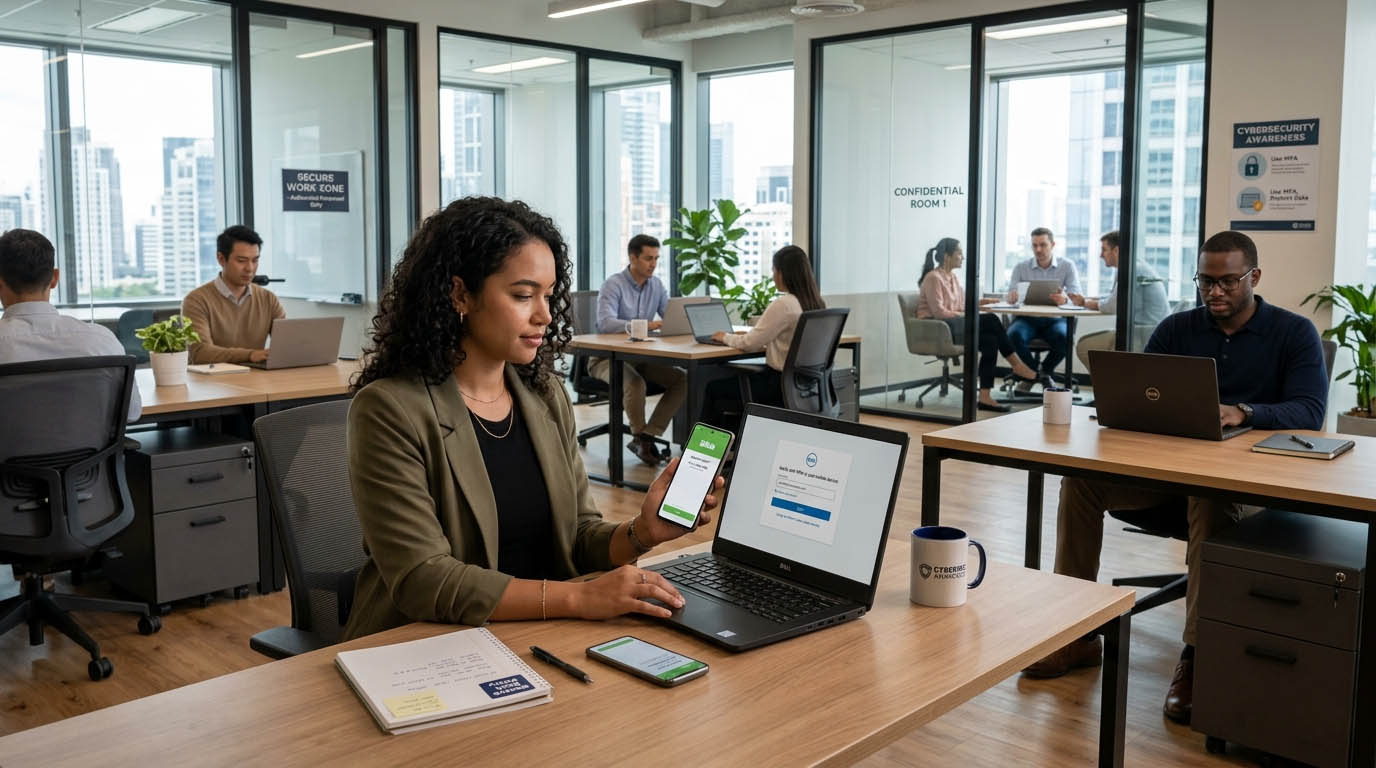
Dedicated rooms for confidential discussions prevent sensitive information from being overheard in open areas.
3. Secure storage points
Lockable drawers and device docking stations reduce the chance of lost or unattended hardware.
4. Visibility of security reminders
Simple visual cues help reinforce safe habits. These can include login prompts, clean desk reminders, and device locking notices.
5. Smart device placement
Positioning screens away from high traffic areas lowers the risk of unauthorized viewing.
Each of these points shows how physical design supports digital protection. It is not about adding friction. It is about making secure behavior feel natural and expected.
The Role of Organizational Policies in Office Design
Policies and design must work together. A policy that requires secure login practices will fail if employees are constantly moving between shared desks without proper access controls. Similarly, a policy that promotes data privacy must be supported by spaces where confidential work can happen safely.
This is where business security measures become relevant in a broader context. These measures are not limited to firewalls or software protections. They extend into how teams access systems, store information, and interact within the workspace.
For instance, organizations may implement multi factor authentication. Without designated quiet zones or private login spaces, employees may delay or skip these steps. The result is reduced effectiveness. Aligning policy with design ensures that security practices are actually followed.
Balancing Collaboration and Protection
Modern offices are built to encourage collaboration. Open layouts, shared desks, and flexible seating promote communication. However, these features can conflict with security needs if not carefully managed. The goal is to create a balance where collaboration remains easy while sensitive data stays protected.
This balance can be achieved through layered design. Open areas can support general work and informal meetings. Enclosed spaces can handle confidential discussions and data handling. Clear boundaries help employees understand where different types of work should happen.
Workspace planning insights such as those found in focus-friendly office layouts show how environments can support concentration. These same principles can be extended to security. Quiet, dedicated spaces reduce distractions and limit exposure to sensitive information.
How Employee Awareness Connects to Physical Space
Awareness is often treated as a training issue. However, the environment plays a major role in reinforcing what employees learn. A well-designed office makes secure behavior visible and easy to follow.
Consider how employees handle devices during breaks. In an environment with clear storage options and visible reminders, they are more likely to lock or secure their devices. In a cluttered or unclear environment, the same behavior becomes inconsistent.
Guidance from organizations such as the UK National Cyber Security Centre highlights the importance of combining physical and digital precautions. This approach strengthens overall protection. It shows that security is not just about tools. It is about habits supported by the environment.
Key Security Factors in Modern Offices
| Factor | Impact | Design Response |
|---|---|---|
| Shared Networks | Risk of unauthorized access | Segmented WiFi zones |
| Open Layouts | Visual exposure of data | Screen positioning and privacy filters |
| Device Mobility | Loss or theft of devices | Secure docking and storage |
| Hybrid Access | Inconsistent security practices | Unified access protocols |
Practical Steps for Designing a Secure Office
Organizations looking to improve security through design can take clear and manageable steps. These actions do not require large investments. They focus on aligning the workspace with real usage patterns.
- Create separate zones for different types of work
- Limit access to sensitive areas through simple controls
- Provide clear storage solutions for devices
- Use signage to reinforce secure habits
- Review workspace layout regularly as teams evolve
These steps help integrate security into daily operations. They ensure that employees do not have to choose between convenience and safety. Instead, both are built into the same system.
Shaping Workspaces for Trust and Confidence
A secure office does more than protect data. It builds confidence among employees and clients. People feel more comfortable sharing ideas and collaborating when they know their information is safe. This sense of trust supports better teamwork and stronger outcomes.
Workplace design continues to evolve alongside technology. As tools become more advanced, the need for thoughtful environments becomes even more important. Offices must support both flexibility and protection in equal measure.
Security is no longer a hidden layer. It is part of the visible and functional design of modern workspaces. Organizations that recognize this shift are better prepared for the challenges of hybrid work and connected systems. They create environments where people can focus, collaborate, and work with confidence.